Essential Live Streaming Equipment: A Stable Internet Connection

For live streaming, stable upload quality with low latency and low packet loss is more important than maximum speed. This article looks at micro-stuttering, buffering, and server memory growth seen while sending the same live source to YouTube over KT and SK connections. It also explains three points to check.
What Is the Most Important Requirement for Live Streaming?
For live broadcasting, I agree that content comes first. Viewers need something worth watching. But if the content is good, what comes next?
Lighting, microphones, and other equipment all matter. But my answer is clear: a good internet connection.
Many creators spend a lot on production tools and methods but pay little attention to the connection that sends their content to the platform. Yet the connection is a basic part of the system that can decide whether viewers keep watching.
A good connection will not bring you viewers, but a bad connection will drive them away.
EQMaker
Using my own experience and real cases, this article explains why the internet connection is so important for live streaming.
Two Failures Caused by Internet Connection Problems
The following two cases come from my own experience. They show how the quality of a live streaming connection can affect not only the broadcast but also the broadcast system itself.
Interrupted Playback: Comparing KT and SK Internet Connections
The video below compares the same live source sent to YouTube at the same time and from the same place over KT and SK Broadband connections. The KT stream on the left plays normally. The SK Broadband stream on the right repeatedly shows micro-stuttering and buffering.
The test system was set up as shown below. WOWZA1 used a KT internet connection. It received the stream from an external RTSP camera and sent the same stream to WOWZA2 over the local network. WOWZA2 used an SK Broadband connection. Both servers sent the same stream to YouTube Live using RTMP.

I also checked both output streams over the local network before they were sent to YouTube. This confirmed that WOWZA1 and WOWZA2 were processing the same stream normally. It also helped separate source or server problems from problems that happened after the stream entered the internet connection.
| Video Time | Type | Delay | Cumulative Delay |
|---|---|---|---|
| 00:06 | Micro-stutter | 0.3 sec | 0.3 sec |
| 00:11 | Micro-stutter | 0.2 sec | 0.5 sec |
| 00:16 | Micro-stutter | 0.3 sec | 0.8 sec |
| 00:22 | Micro-stutter | 0.2 sec | 1.0 sec |
| 00:27 | Micro-stutter | 0.3 sec | 1.3 sec |
| 00:31 | Buffering | 1.6 sec | 0.9 sec |
| 00:36 | Micro-stutter | 0.3 sec | 1.2 sec |
| 00:42 | Micro-stutter | 0.2 sec | 1.4 sec |
| 00:48 | Micro-stutter | 0.3 sec | 1.7 sec |
| 00:54 | Micro-stutter | 0.2 sec | 1.9 sec |
| 01:00 | Micro-stutter | 0.3 sec | 2.2 sec |
| 01:06 | Micro-stutter | 0.3 sec | 2.5 sec |
| 01:11 | Micro-stutter | 0.2 sec | 2.7 sec |
| 01:17 | Micro-stutter | 0.3 sec | 3.0 sec |
| 01:22 | Buffering | 1.1 sec | 3.1 sec |
| 01:28 | Micro-stutter | 0.2 sec | 3.3 sec |
| 01:33 | Micro-stutter | 0.3 sec | 3.6 sec |
| 01:38 | Micro-stutter | 0.2 sec | 3.8 sec |
| 01:43 | Micro-stutter | 0.3 sec | 4.1 sec |
| 01:48 | Micro-stutter | 0.2 sec | 4.3 sec |
| 01:54 | Micro-stutter | 0.3 sec | 4.6 sec |
| 01:59 | Micro-stutter | 0.2 sec | 4.8 sec |
| 02:03 | Micro-stutter | 0.3 sec | 5.1 sec |
As the table shows, repeated micro-stuttering added 5.1 seconds of delay in just over two minutes. Even when the same live source is sent from the same place, the condition of the internet connection can cause broadcast delay.
At 00:31 and 01:22, the cumulative delay increased by less than the buffering time or even went down. This happened because the YouTube player skipped part of the stream after long buffering. Skipping reduced the gap between playback and the live point. This result was seen only in this test environment and at this time. It does not mean that the same result will occur with every ISP.
This result may be easy to expect. However, the transmission delay can cause another problem.
Failure of the Streaming Equipment
I provide broadcast delivery services to television channel operators. Some of our clients send broadcast signals to OTT platforms to operate live channel services.
One day, while monitoring OTT outputs, I saw brief freezes on several channels. At first, I did not think the problem was serious. I rebooted the origin server, and the problem disappeared. A few days later, the same problem returned at about the same time. After nearly two weeks of troubleshooting, I found the cause.
Data sent from the origin server to YouTube was not being transmitted on time because of connection delay. The queued data accumulated in memory until the origin server ran short of available memory. The process can be summarized as follows.
- People come home after a tiring day and start watching YouTube.
- Traffic destined for YouTube increases within the ISP, creating a bottleneck.
- The bottleneck gradually delays the stream that the origin server must send to YouTube.
- Data that cannot be transmitted on time waits in the origin server’s output buffer.
- As the delay continues, the amount of queued data held in memory increases.
- As available memory decreases, other streams processed by the same origin server are also affected.
- Everything starts doing the stutter dance together.
Poor internet connection quality does more than harm the viewer’s experience. It can also directly affect the streaming equipment.
The graph below shows the memory usage of WOWZA2, which used the SK Broadband connection in the test. Data waiting to be sent built up in memory because of the transmission delay. Memory usage increased by about 2.5 GB in one hour. If the server had only 4 GB of available memory, it would use all of it in less than two hours.
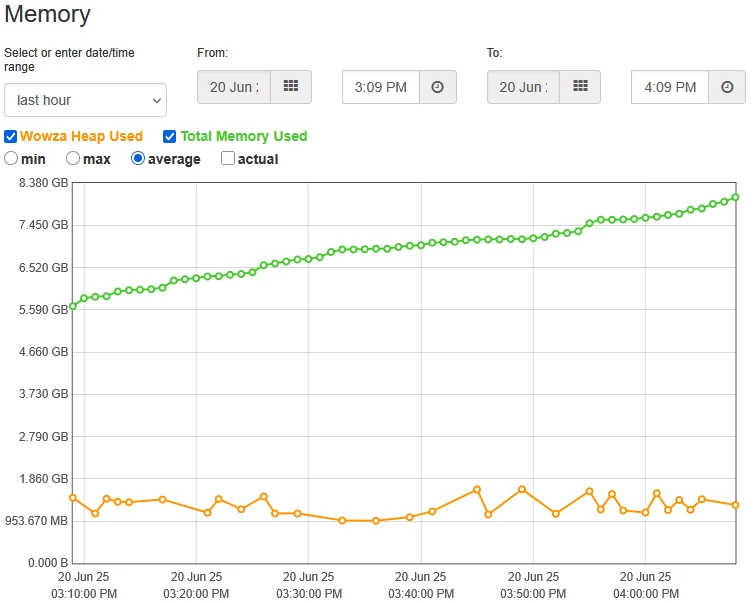
For a short operation, this may not become a serious problem at once. Rebooting the server clears the memory and stops the problem for a while. But rebooting is not a proper solution for long-running or multi-channel services. The same problem can return whenever the connection delay returns.
How an Unstable Internet Connection Affects a Live Channel
An unstable internet connection does more than delay video, lower image quality, or create block artifacts. When playback stutters, the flow of both video and audio breaks. If this happens again and again, viewers leave. Viewers may also remember the channel as unreliable. After repeated problems, they may ignore other content from the same channel.
The streaming system is also affected. As queued data builds up, memory usage rises and available memory falls. In the end, the streaming application or the whole system may stop. A long-running live channel therefore needs more management. Operators must monitor memory usage, check the connection, and restart systems when needed.
Which Internet Connection Should You Choose?
First, I want to make one point clear: I am not saying that KT is better. Among Korea’s four major ISPs—KT, LG, SK, and Sejong—I have used dedicated services from all except LG, and none of them was completely free of problems. Given the nature of the internet, a problem can occur at any point along a route and at any time.
Even so, you can lower the risk and make recovery easier. I recommend checking the following points when you choose a connection.
Wired over Wireless | xDSL over HFC | Fiber over Copper
Among the services offered by an ISP, choose the one with better technical stability. The stream should not fail before it even reaches the ISP’s network.
Between wireless and wired services, wired connections are generally more stable. Wireless technology is very convenient and has improved greatly. But it still has the physical limits of radio waves.
Among copper-based services, HFC can be less stable than xDSL. HFC users share limited access-network capacity, so it can be harder to keep the quality stable.
Between fiber and copper services, fiber is generally more stable. Distance from the ISP’s facility has less effect on the signal, and fiber uses newer access-network technology.
These are general rules. Actual results can change with the location and the ISP’s network. The key point is to choose a service that keeps a stable connection.
Choose an ISP with Sufficient Connectivity to the Platform
After the stream reaches the ISP, the ISP decides where to send it. If the platform is inside the same ISP network, the data can stay on that network. If not, the ISP must send it to another network.
An ISP’s internal backbone usually has a lot of capacity. But traffic going to another ISP must pass through an interconnection point, or IX. An IX often has less capacity than the internal backbone. International links can have even less capacity. Because many users share the same path, heavy traffic at certain times can create a bottleneck.
Using the same ISP as the platform, or an ISP with a good route to that platform, can reduce the number of inter-provider links and the risk of congestion. For an overseas platform, choose an ISP with many international links and enough capacity.
In my experience, this type of problem did not occur when I connected to platforms on domestic networks. It occurred with overseas platforms or services running on overseas cloud systems.
Use a Business Service with an Escalation Path
A sales representative cannot solve a technical problem directly. But when a failure occurs, that person can connect you to the engineers or operations team that can help. I used dedicated business connections, so I could contact the NOC through the account representative and ask for action.
These services cost more than normal consumer internet plans. But when a connection fails, having a clear support contact makes a major difference.
Conclusion
It is natural to invest in microphones, cameras, and other production equipment. But the internet connection is the final path that delivers the content to viewers.
Do not choose a connection only by its advertised maximum speed. For many live streams, a 100 Mbps service provides enough bandwidth. What matters more is stability: low latency, low packet loss, and a steady upload bitrate.
For that reason, consider all three factors together: ① whether the ISP has good connectivity to the destination platform, ② whether the service uses a technically stable access method, and ③ whether sufficient technical support is available when a failure occurs.
A stable internet connection is one of the most important pieces of equipment in live streaming.
FAQ
- What type of internet service should I choose for live streaming?
- Choose a wired service with stable upload quality instead of looking only at maximum speed. If possible, use fiber. Also check the route to the target platform, international capacity, and technical support.
- For live broadcasting, is a faster connection better than a more stable one?
- If the connection has enough upload bandwidth, the more stable one is better. Live streaming needs low latency, low packet loss, and a steady upload speed. A stable 100 Mbps connection can be better than an unstable 10 Gbps connection.
- What are the three requirements for a live streaming connection?
-
- Does the ISP provide good connectivity and sufficient interconnection capacity to the target platform?
- Can the service sustain the live stream’s upload bitrate over long periods?
- Can the provider offer technical support and investigate the cause of a failure?
- What is an IX, and what does it do?
- An IX, or Internet Exchange, is a point where different ISPs or networks exchange internet traffic. A live stream sent to another network may pass through an IX. If the IX does not have enough capacity or traffic becomes heavy, delay and congestion can occur.
- Why does interconnection capacity matter?
- If too much traffic uses a path with too little capacity, congestion, delay, and packet loss become more likely. In live streaming, this can cause micro-stuttering, buffering, delivery delay, and more load on the streaming system.
- Is live streaming impossible over copper services such as xDSL or HFC?
- No. Live streaming over a copper connection is possible. But copper services can be more affected by distance, building wiring, shared access-network load, and the local environment. Some of my clients send live broadcast signals over copper connections. The important point is whether the connection can keep the required upload bandwidth stable.
- Why can cumulative delay decrease after buffering?
- After long buffering, the YouTube Live player may skip part of the stream to move closer to the live point. Some video is not played, so the measured cumulative delay can decrease.
- Can connection delay be overcome through streaming technology?
- If the platform supports an ingest method other than RTMP PUSH, or a protocol with retransmission and buffering, you can test it. A buffered protocol such as HLS can reduce the effect of short connection changes, but it adds latency. Changing the protocol alone cannot fix low interconnection capacity or continuous packet loss.
Update History
- — First published
- — Rewritten and migrated to EQMaker